Human Review
Last updated: July 30, 2026
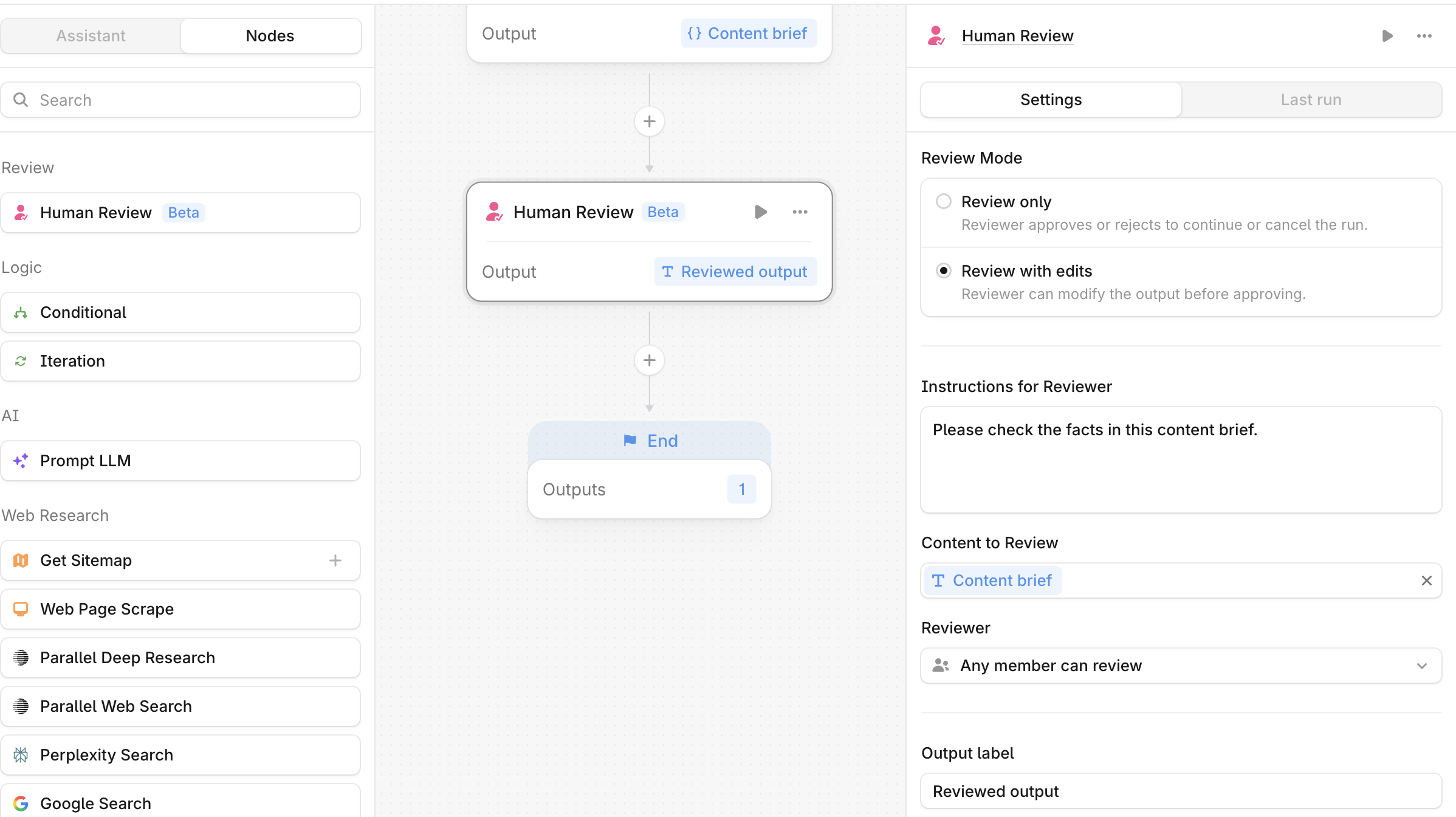
The Human Review node adds a review step inside an Agent's workflow. Use it when a person needs to approve, reject, or edit an Agent's output before the run continues.
When to use this node
Use the Human Review node for tasks such as:
Reviewing AI-generated content before publishing
Sending generated ads, claims, or messaging to a legal or compliance reviewer before they go live
Approving a content brief, then generating the article from the approved version
Limitations
The Human Review node works only with text or string values and doesn't support lists, numbers, or other variable types.
The node doesn't work with the Iteration node. However, it can run in Sheets, and multiple Human Review nodes can run sequentially within the same Agent.
Configuration
Review mode (required)
Choose what the reviewer can do:
Review only: the reviewer approves or rejects the output to continue or cancel the run.
Review with edits: the reviewer can edit the output before approving.
Instructions for Reviewer (optional)
Add guidance for the person reviewing this step.
Content to Review (required)
In the dropdown menu, select the variable that holds the content you want reviewed.
Reviewer (required)
Choose who can review the step:
Any member can review: any workspace member can respond, and the first response completes the review.
Current user: only the person who runs the Agent can review. To other team members, the Agent appears in a waiting state.
Output label (required)
Enter a descriptive label for this step's output, such as reviewed_output or approved_brief, or keep the default.
Output
The node returns the reviewed result as text. In Review only mode, this is the approved output. In Review with edits mode, this is the reviewer's edited version. The run pauses at this step until the reviewer responds, then continues on approval. On rejection, the run stops and appears as failed in Past runs.
Example use case: Approve the article content before publishing it to your Wordpress site
Add the node that generates your content, such as 📄 Generate Article.
Add a Human Review node. In Content to review, select the generated content from step 1. Set Output label to
approved_content.Add a 📄 WordPress - Create Post node that publishes
approved_contentto your WordPress site if the changes are approved.
Best practices
Place this node before publishing. Add it before any step that publishes or applies changes, so nothing goes live without review.
Write clear reviewer instructions. The reviewer may not know what the Agent is doing. Clear instructions help them understand what's needed and respond quickly.
Chain Human Review nodes. When you use Review with edits to request content edits from a team member, add a second Human Review node set to Current user so you can check the changes before handing control back to the Agent.
FAQ
How do my team members know if they need to review something?
For now, the Agent run page is the only place to check for pending reviews. Notifications for pending reviews are in development. As a workaround, add a Slack, Gmail, or other messaging node right before the Human Review node to tell your team to check the Agent run.
Does an Agent run paused for review have a timeout?
No. The run stays paused until the review is complete.
How do I stop or cancel a paused Agent run?
If you created the Agent that's asking for a review, stop the run by selecting Stop on the published Agent page. If you're a team member who didn't create the Agent, cancel the run by rejecting the review (Start Review > Reject) on the published Agent page.
Can I request more than one person for the review?
No, each node has only one reviewer. To collect reviews from multiple team members, chain Human Review nodes sequentially.