Web Page Scrape
Last updated: June 12, 2026
The Web Page Scrape node retrieves content from a single webpage and returns it in a clean, structured format. Use this step when you need to analyze, summarize, or extract information from any publicly accessible URL.
This node supports both raw HTML and cleaned markdown outputs, making it useful for downstream AI processing in Prompt LLM steps or for building structured research Agents.
Check out 📄 Getting started with Agents to learn how to add this node to an Agent.
When to use this node
Use Web Page Scrape for tasks such as:
Gathering content from articles, landing pages, blog posts, or documentation
Extracting text for summarization or competitive analysis
Pulling structured content for use in downstream LLM prompts
Normalizing webpage content before ingestion into other Agent steps
Node configuration
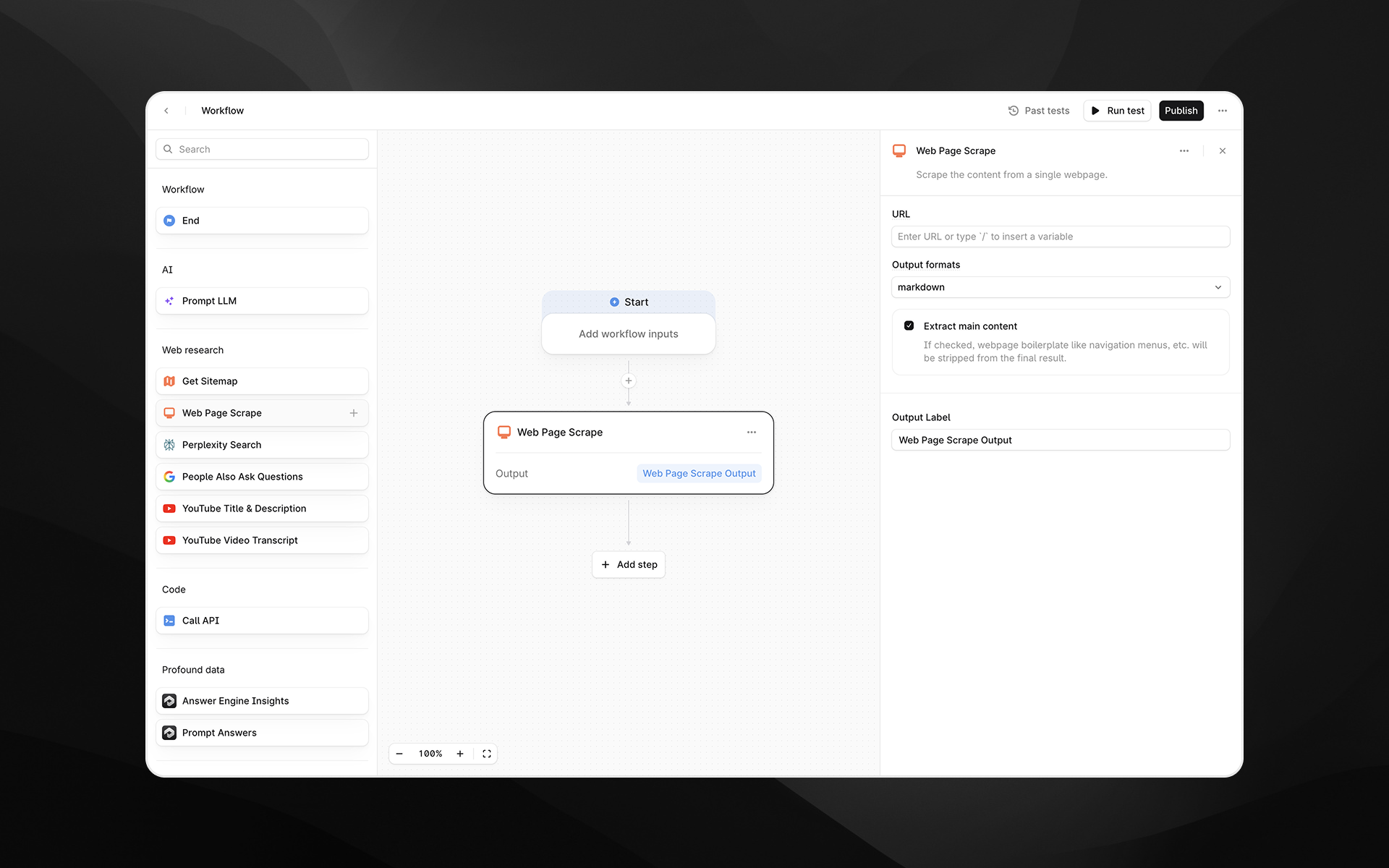
Selecting the Web Page Scrape node opens its configuration panel on the right side of the Agent Builder. This node includes the following fields.
URL (required)
Enter the webpage URL you want to scrape.
You can either:
Paste a static URL, or
Insert a variable by typing
/to reference Agent inputs or outputs from previous steps
Render Output As
Choose the format for the scraped content. Available options:
Markdown – Returns cleaned, readable text suitable for LLM processing
HTML – Returns the page’s HTML structure
Markdown is recommended for most AI-powered tasks, while HTML is useful when tags, structure, or metadata are important.
Extract main content
When enabled, Profound attempts to remove navigation elements, ads, footers, boilerplate, and other non-core content. This generally results in a cleaner output focused on the primary article or body text.
Disable this option if you need the full page content without filtering.
Output Label
Provide a descriptive label for the output of this step. The label becomes the variable name you will reference in later Agent nodes.
Examples:
page_contentscraped_markdownraw_html
Output
This node returns a single text output containing the scraped page content in the selected format. The output can be used in:
Prompt LLM steps
Additional research or parsing nodes
API calls
Any downstream transformation step
Example usage
1. Scrape and summarize a webpage
Add a Web Page Scrape step and set the URL to the page you want to analyze.
Choose Markdown as the output format.
Add a 📄 Prompt LLM step that references the scraped content:
Summarize the key ideas from the following content:

{{web_page_scrape.output}}
2. Extract structured data from HTML
Scrape the page using the html format.
Pass the HTML into a 📄 Prompt LLM step with extraction instructions:
Extract all product names and prices from the following HTML. Return JSON.Best practices
Use Markdown output for the cleanest AI-ready text.
Enable Extract main content when targeting article-style pages.
If scraping fails, confirm that the URL is publicly accessible and does not require authentication.
Keep output labels clear and descriptive to simplify downstream references.
Troubleshooting
The scraped content is empty or incomplete
This can occur if the page relies heavily on client-side rendering or uses anti-scraping protection. Try switching to html output for more raw content.
Boilerplate text appears in the output
Ensure Extract main content is enabled to reduce clutter.
The URL contains variables that are not resolving
Type / to insert supported variables and avoid mismatched parameter names.