Perplexity Search
Last updated: June 12, 2026
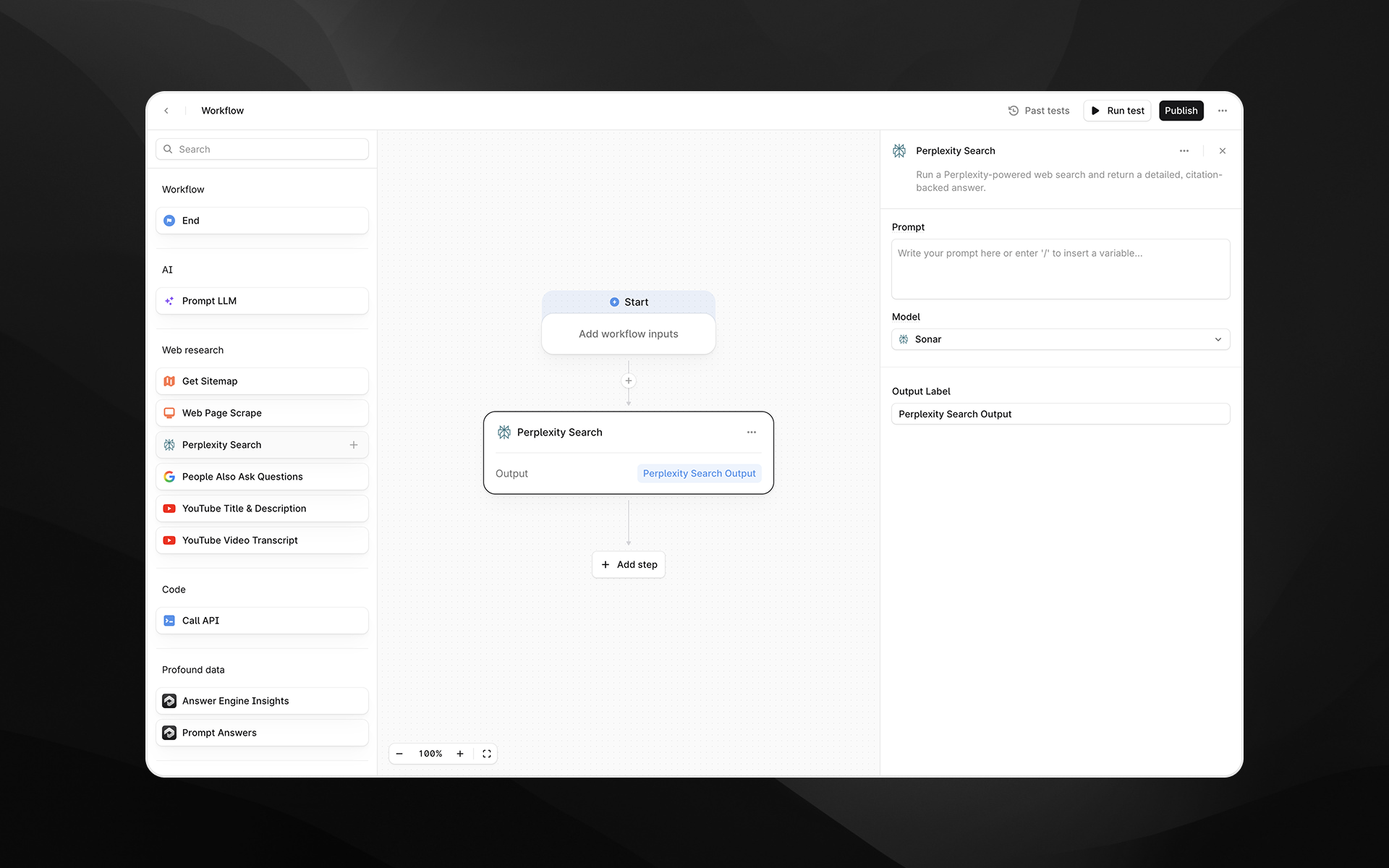
The Perplexity Search node runs a Perplexity-powered web search and returns a detailed, citation-backed answer. Use this step when you need synthesized research, verified facts, or aggregated insights from multiple reputable sources.
This node is useful for Agents that require high-quality search results before passing the information into LLM steps, analyses, or downstream transformations.
Check out 📄 Getting started with Agents to learn how to add this node to an Agent.
When to use this node
Use Perplexity Search for tasks such as:
Gathering up-to-date information about a topic, product, company, or trend
Performing competitive analysis or market research
Extracting factual answers supported by citations
Enriching Agents that rely on current web data prior to LLM processing
Node configuration
Selecting the Perplexity Search node opens its configuration panel on the right side of the Agent Builder.
Model
Choose the Perplexity model used to process the query. Available options may differ in speed, reasoning depth, and output quality:
Sonar
Sonar Pro
Sonar Reasoning
Sonar Reasoning Pro
Sonar Deep Research
Select a model appropriate for the complexity and depth of the research needed.
Prompt
Enter the query or instruction you want Perplexity to research.
You can type text directly or insert variables from earlier Agent steps by typing /.
Examples:
“What are the latest pricing updates for HubSpot Enterprise?”
“Summarize the top three competitors to {{brand_name}} and provide source links.”
Output Label
Assign a descriptive label to this step’s output. The label becomes the variable name available to later nodes.
Examples:
perplexity_answerresearch_summarycompetitive_insights
Output
This node returns a single structured text output containing Perplexity’s synthesized answer, including citations to the underlying sources. The output can be passed directly into steps such as:
Prompt LLM
Answer comparison or scoring Agents
Additional research steps
API calls or data extraction logic
Example usage
1. Run a research query and summarize with LLM
Add a Perplexity Search step with a prompt such as:
“Explain the latest changes to Google’s AI Overviews and cite sources.”Add a 📄 Prompt LLM step:
Summarize the following research into 5 bullet points and highlight any implications for SEO:

{{perplexity_search.output}}
2. Dynamically research competitor information
Pass a brand name into the Agent as an input.
Use Perplexity Search:
“Provide a competitor overview for {{brand_name}} with citations.”Use the output to generate analysis or comparisons downstream.
Best practices
Provide clear, specific prompts to get more accurate citations and structured outputs.
Use more advanced models (e.g., Sonar Reasoning Pro or Sonar Deep Research) for complex or multi-step research queries.
Combine Perplexity Search with Prompt LLM steps to refine, structure, or format the research for your use case.
Troubleshooting
Output lacks depth or detail
Try switching to a higher-tier model such as Sonar Pro or Sonar Deep Research.
Variables are not recognized in the prompt
Type / in the prompt field to insert supported Agent variables.
Returned information seems outdated
Reframe the query to explicitly request the most recent updates or year-specific results.