YouTube Title & Description
Last updated: June 12, 2026
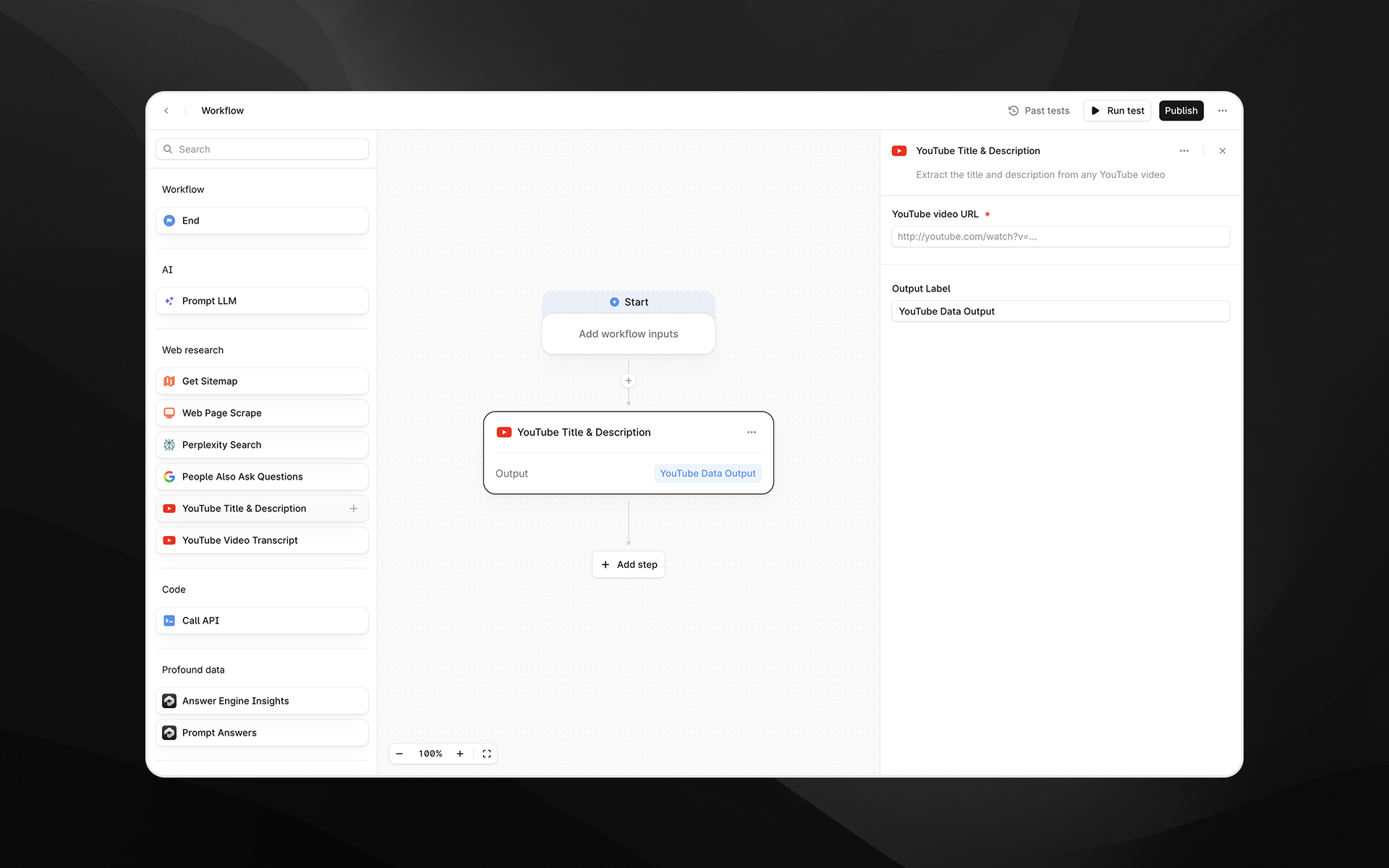
The YouTube Title & Description node extracts the title and description from any publicly accessible YouTube video. Use this step when you need structured metadata for analysis, summarization, competitive research, or to feed into downstream LLM Agents.
This node provides a clean, text-based output containing both fields, making it easy to integrate YouTube content into broader research or automation pipelines.
Check out 📄 Getting started with Agents to learn how to add this node to an Agent.
When to use this node
Use YouTube Title & Description for tasks such as:
Analyzing how competitors position and describe video content
Generating summaries, rewrites, or metadata optimizations using LLMs
Pulling YouTube context into AEO, SEO, or content strategy Agents
Extracting structured information before running additional transformations
Node configuration
Selecting the YouTube Title & Description node opens its configuration panel on the right side of the Agent Builder.
YouTube video URL (required)
Enter the URL of the YouTube video you want to extract data from.
You can:
Paste a direct YouTube watch URL
Insert a variable from earlier Agent steps by typing
/
Supported formats include typical watch URLs such as:https://www.youtube.com/watch?v=VIDEO_ID
Output Label
Provide a descriptive label for the output generated by this step. The label becomes the variable name that downstream steps reference.
Examples:
youtube_metadatavideo_infoyt_title_description
Output
This node returns a text output containing:
Video title
Video description
The output can be passed into:
Prompt LLM steps (for summarization, rewriting, tone analysis, etc.)
Content comparison Agents
Metadata optimization pipelines
Any downstream step requiring structured text
Example usage
1. Analyze a competitor video description
Add a YouTube Title & Description step with a competitor video link.
Add a 📄 Prompt LLM step to interpret the content:
Analyze the tone, target audience, and messaging strategy in the following video title and description:

{{youtube_metadata_output}}
2. Rewrite metadata for optimization
Add an Agent input called
video_url.Use YouTube Title & Description with
video_url.Pass the output into a 📄 Prompt LLM node:
Rewrite the following YouTube title and description to improve clarity and increase click-through rate: {{video_info.output}}Best practices
Ensure the video URL is publicly available; private or restricted videos cannot be accessed.
Use descriptive output labels to keep Agents clear, especially when working with multiple videos.
Combine with the YouTube Video Transcript node for deeper semantic analysis of video content.
Troubleshooting
The node returns no data
Verify that the YouTube URL is valid and not restricted or private.
The output includes unexpected formatting
Use a Prompt LLM step to clean or reformat the extracted text as needed.
Variables do not resolve when used as the URL
Insert variables by typing / and selecting from the available options in the picker.