Categories: how your AEI data is organized
Last updated: September 24, 2026
Find definitions of unfamiliar terms and concepts in 📄 Profound glossary.
Categories organize your Answer Engine Insights (AEI) data. Each category groups the prompts, topics, assets (your own brands and competitors), and regions you track for a market, business unit, brand, or geography.
Categories keep markets separate. For example, a bank that competes in credit cards, mortgages, and wealth management faces different competitors and questions in each market, so each gets its own category. Profound runs the prompts and reports the results inside that boundary, so every AI search data point compares you against the right competitors on the right questions.
Category structure and how it relates to other Profound building blocks
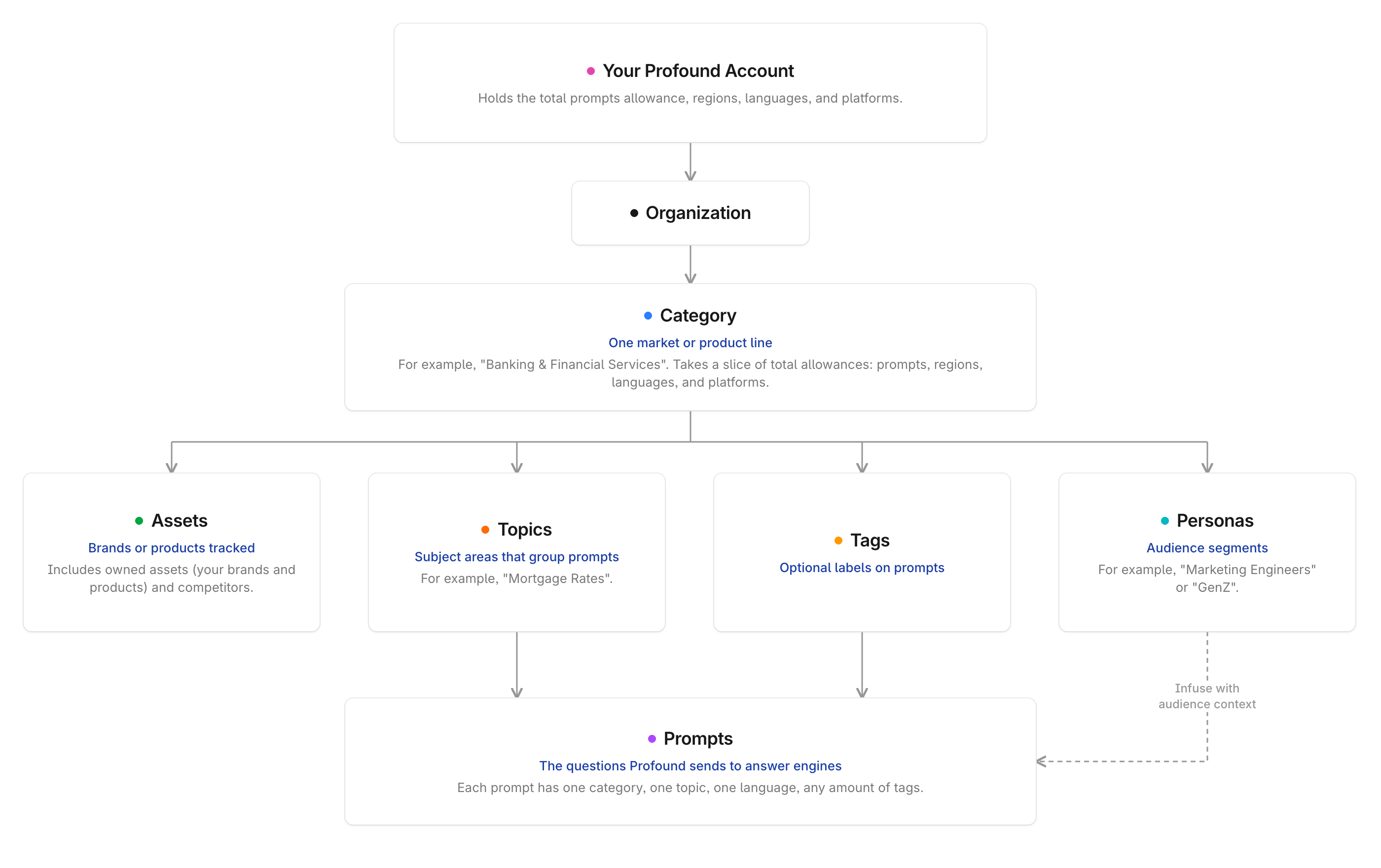
Your Profound account holds your total prompt allowance and the regions, languages, and platforms it can monitor. Categories draw from that pool: each one takes a share of the prompts and a subset of the regions, languages, and platforms.
An organization is a bucket for all of your Profound data, including AEI, Agents, Sheets, brand context, Aim conversations, and Documents. An organization uses categories to organize its AEI data.
A category is the market unit you analyze, for example "financial services" or "home decor products." Each category has a name, a share of the account's prompts, and the regions, languages, and platforms it runs in, chosen from those available to your account. An organization can own and use multiple categories.
Assets are the brands or products you track in a category. An asset is either owned (yours) or a competitor. Every category needs at least one enabled owned asset. Competitors default to a limit of five per category.
Topics are the subject areas your prompts cover, such as "Purchase decisions" or "Travel rewards." Every prompt belongs to one topic, so topics are how analytics reports group prompts. The Prompt generator uses topics to generate relevant prompts.
Prompts are the questions Profound sends to answer engines. A prompt lives in one category and one topic, and runs in one language. Prompts have types that define which analysis Profound runs on the responses: Visibility, FactCheck, or Sentiment.
Tags are optional labels you add to prompts inside a category to organize them in a way the topics don't cover, for example by campaign or buying stage. A prompt can carry multiple tags.
Personas are the audience segments you define for a category. Learn more in 📄 Personas in Answer Engine Insights.
Regions, languages, and platforms define where prompts run, in which language, and on which answer engines. View your organization's lists in Analytics Setup.
Learn more about prompts, topics and tags in 📄 How to create topics and prompts to track in Profound.
When you have multiple organizations and categories
If you work with more than one organization or category, here’s how they relate:
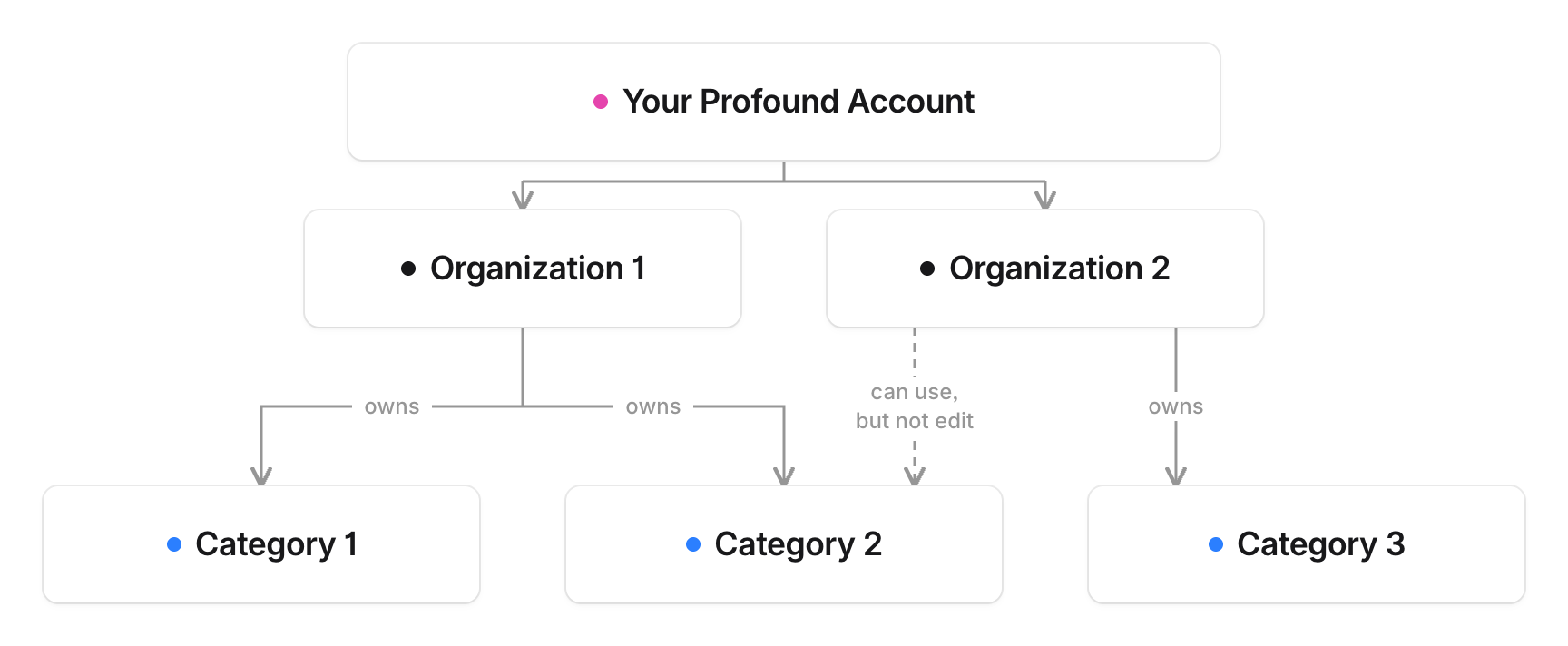
An organization can create, own, and share categories with other organizations.
Your organization can use a shared category, but only the owning organization can edit it.
Your Profound contract sets the number of categories your organization can use.
Where you work with categories
Answer Engine Insights (AEI): Every category-scoped page has a selector at the very top of the page that shows the owning organization, the categories you can view, and the owned assets in the selected category. Filters for topics, tags, regions, platforms, and personas apply within that category.
Learn more in 📄 Interpret Answer Engine Insights v2.
AEI reports on one category at a time. When you need the bigger picture, use Aim and Dashboards to combine analytics data across your categories.
Analytics Setup: Admins of enterprise organizations use Analytics Setup to create and manage categories, allocate prompts, choose regions and languages, and add assets.
People. When you invite a member on the People page, choose the categories they can open in the Category field. Learn more in Add and manage team members in Profound.
Onboarding. New users set up their first category in the onboarding flow: confirm your brand, add owned and competitor assets, review generated topics, and generate prompts.
Profound API and MCP. Reports provided by the API or MCP tools are scoped by category. Learn more in the REST API reference and MCP documentation.