Answer Engine Insights settings
Last updated: September 15, 2026
Overview
Settings in Answer Engine Insights (AEI) is your control center for defining how Profound processes, classifies, and analyzes AI engine responses to generate insights. Think of it as a translation layer: it maps the raw text AI engines produce to the clean objects you see across your dashboards.
Open settings from the top-right corner of AEI view, next to Export answers.
AEI settings are specific to visualizations and data generation. To open organization and account settings, select your organization name at the top left of the platform, then select Settings.
Prompts
To open the Prompt Designer, go to Answer Engine Insights > Prompts > Modify prompts. From there, select the prompts you want to tag or modify. Learn more in 📄 Create, manage and tag prompts.
Configure Competitors
If this section is blank in your AEI settings, that's expected. Configure Competitors isn't a setup tool, it's a filter for edge cases.
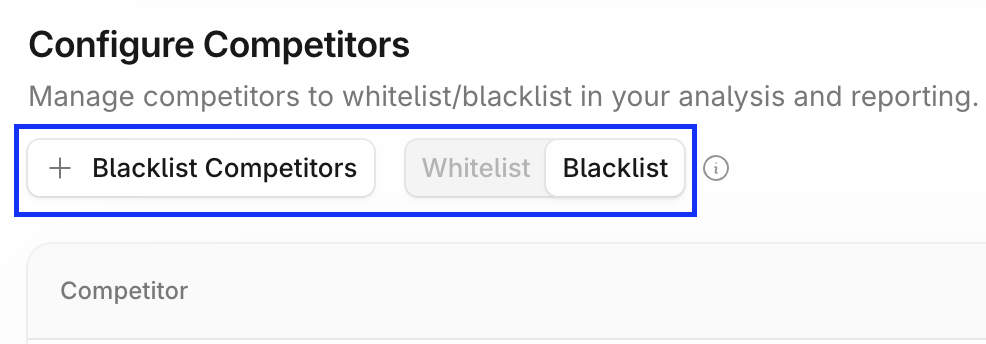
During onboarding, your Profound team configures your primary competitive set. Configure Competitors exists for the exceptional cases where you need to manually filter which brands appear in your AEI analysis. It has two modes: Whitelist (include) and Blacklist (exclude).
Mode | What it does | When to use |
Blacklist | Removes specific brands from all AEI analysis | Rarely, and only for genuinely irrelevant or restricted brands |
Whitelist | Shows only listed brands in the AEI analysis | Not recommended: distorts and narrows data |
When to blacklist
Use Blacklist to remove a brand from your results entirely. Apply it when a brand appears in your analysis but isn't a relevant competitor, or is a competitor you aren't permitted to mention.
Common examples:
Large platform companies (Google, Amazon, Apple) appearing in a niche competitive set
Brands from adjacent industries that aren't true competitors
Affiliate companies you don't want in your competitive benchmarking
To exclude a brand, switch to Blacklist mode, select + Blacklist Competitors, and type the brand name into the list.
When to whitelist
Whitelisting can artificially inflate your visibility score, so we don't recommend using it.
In Whitelist mode, Profound only shows results from AI responses where one of the brands on your list appears. Profound excludes any response that mentions none of your listed brands from calculations entirely. That creates a narrow, less realistic view of your competitive landscape.
If relevant competitors aren't showing up in your results, refine your prompts instead so they reflect your broader industry and both direct and indirect competitors.
Citation Categories
Citation Categories classify the sources AI engines cite when generating responses. Knowing where your citations come from, and controlling how they're grouped, is one of the most useful ways to work with citation data in Profound.
Default categories
Profound assigns every cited domain to one of the default categories. Learn more in Interpret Answer Engine Insights.
Custom categories
Custom categories track any grouping that matters to your strategy: partner sites, PR placements, online travel agency sites, comparison engines, or anything else.
Custom categories are useful when you want to:
Define indirect competitors: bulk-paste the 10–20 competitors outside your primary competitive set into a custom category so they're pulled out of Other
Run content experiments: categorize a set of URLs or a single subpath you've optimized, then measure the before and after citation share for that content
Apply earned media tiers: separate top-tier placements from general earned media for more granular analysis
The Other category catches everything that doesn't fit the default categories, so it grows large and vague over time. Use custom categories to split it for clearer citation analysis.
Create or edit a category
You define the Owned, Competition, and custom categories during initial setup with your account team. Profound assigns the rest automatically. Override or delete those assignments at any time with the + Add Citation Category option.
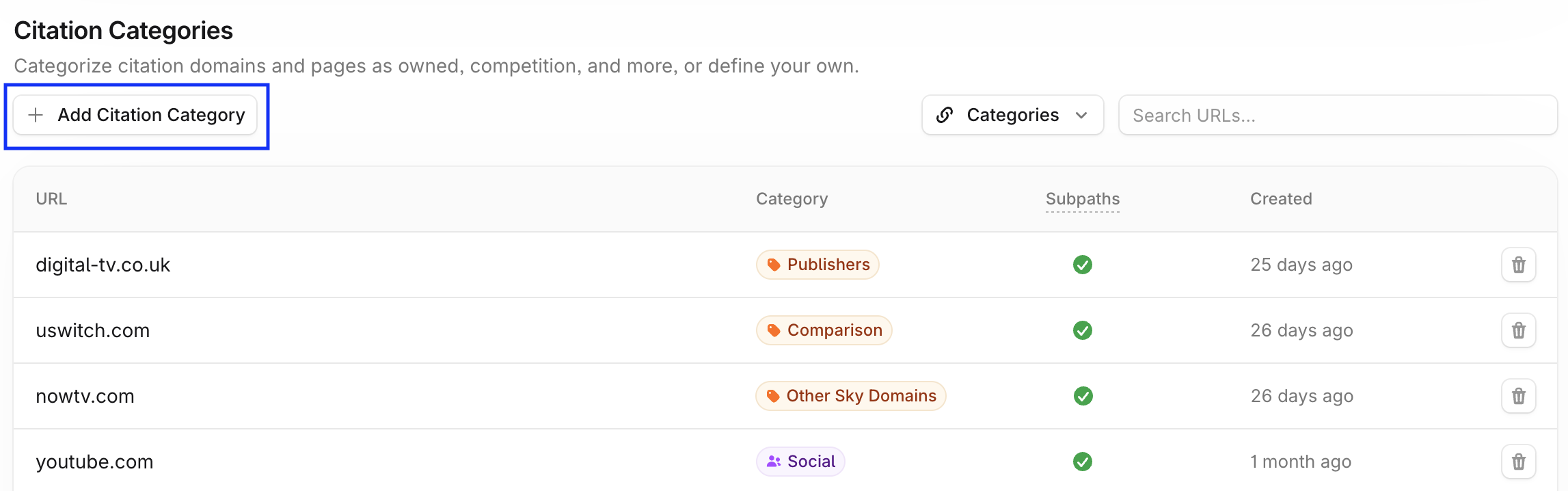
Create custom categories in the same + Add Citation Category dialog. In the Citation Category dropdown, type the category name in the filter field, then select + Add new category to save it.
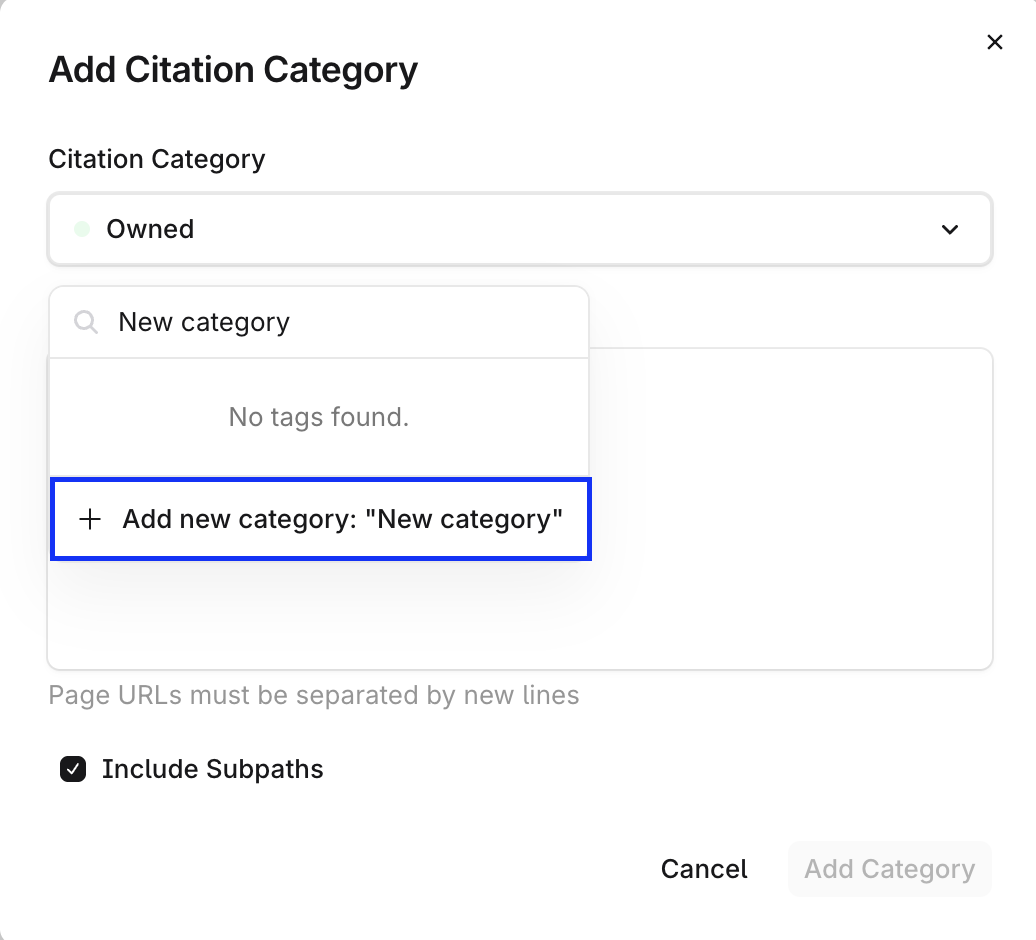
Category assignment works at the domain and subpath level. Enable Include Subpaths to capture every page under a domain, so tagging tryprofound.com also covers tryprofound.com/blog and tryprofound.com/resources. Or disable it and paste a specific path, such as yoursite.com/blog, to categorize that section on its own.
Name Matching
Name Matching connects the different names that answer engine responses use for your brand and your competitors' brands. For example, Profound may appear as "Try Profound," "Profound Metrics," or "Profound Search." Name Matching groups all variations under the same asset. Without it, each variation counts as a separate entity, which makes your visibility look lower than it is.
How it works
Profound combines string matching, fuzzy matching, and an LLM review step to group similar phrases under a single asset. Profound surfaces candidates automatically, and you decide which mappings to accept.
Name Matching has three views:
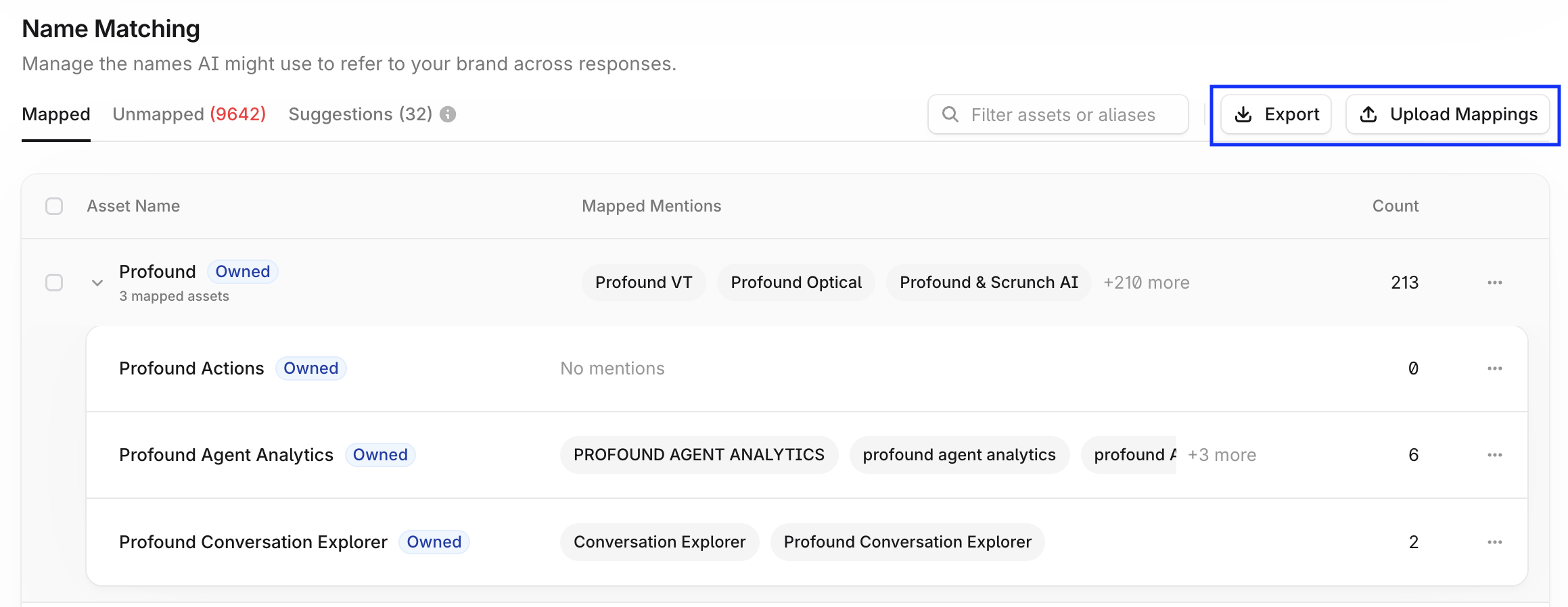
Mapped — Every asset with its currently mapped mentions, plus a total mention count. Child assets nest under their parent.
Unmapped — Brand mentions Profound detected but hasn't matched to an asset yet, with the date first seen and a mention count.
Suggestions — Automatic suggestions for mapping mentions to assets, based on text similarity.
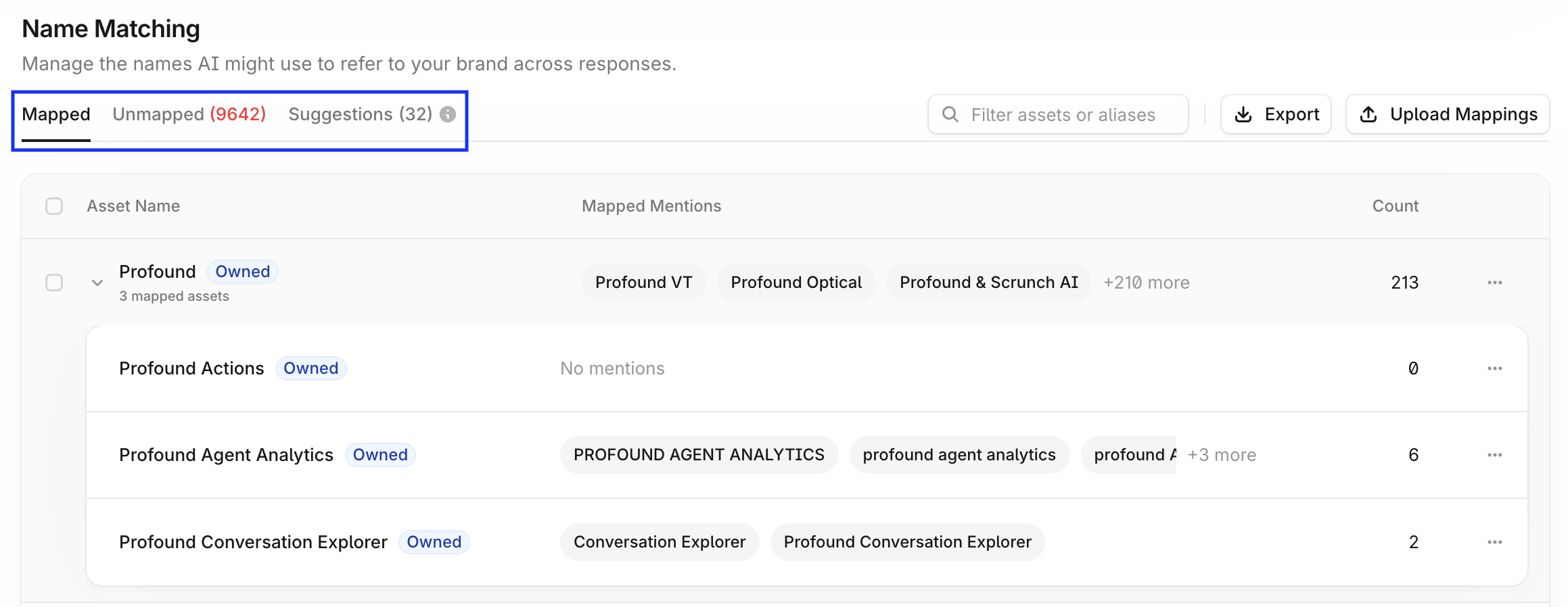
Profound aggregates responses and identifies unmapped listings automatically. Map these values to an existing asset, or create a new asset for future values.
Manage existing mappings
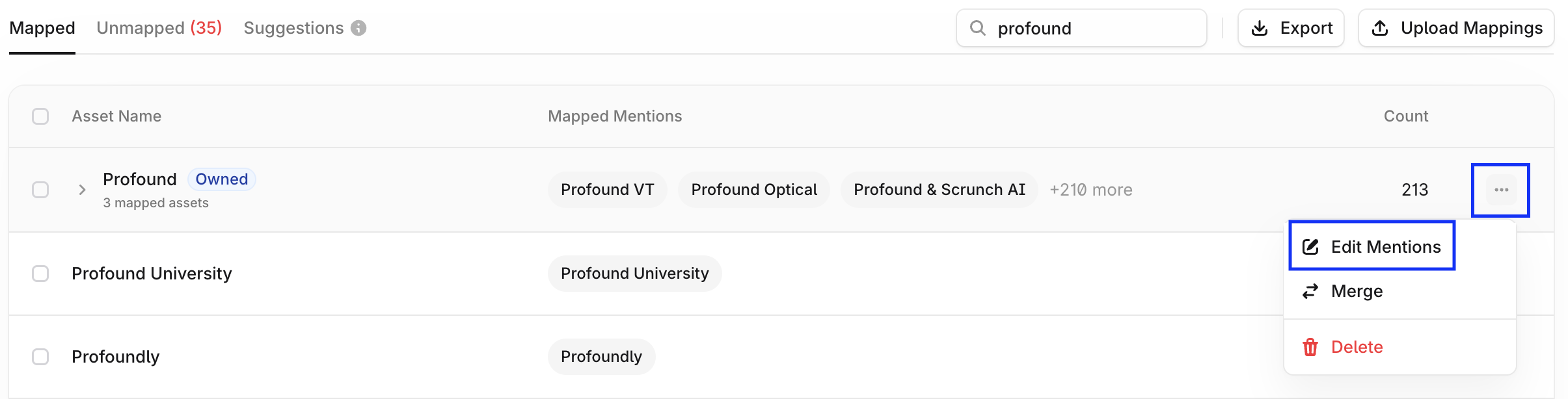
To manage or add mapped mentions, select Edit Mentions in the asset's action menu.
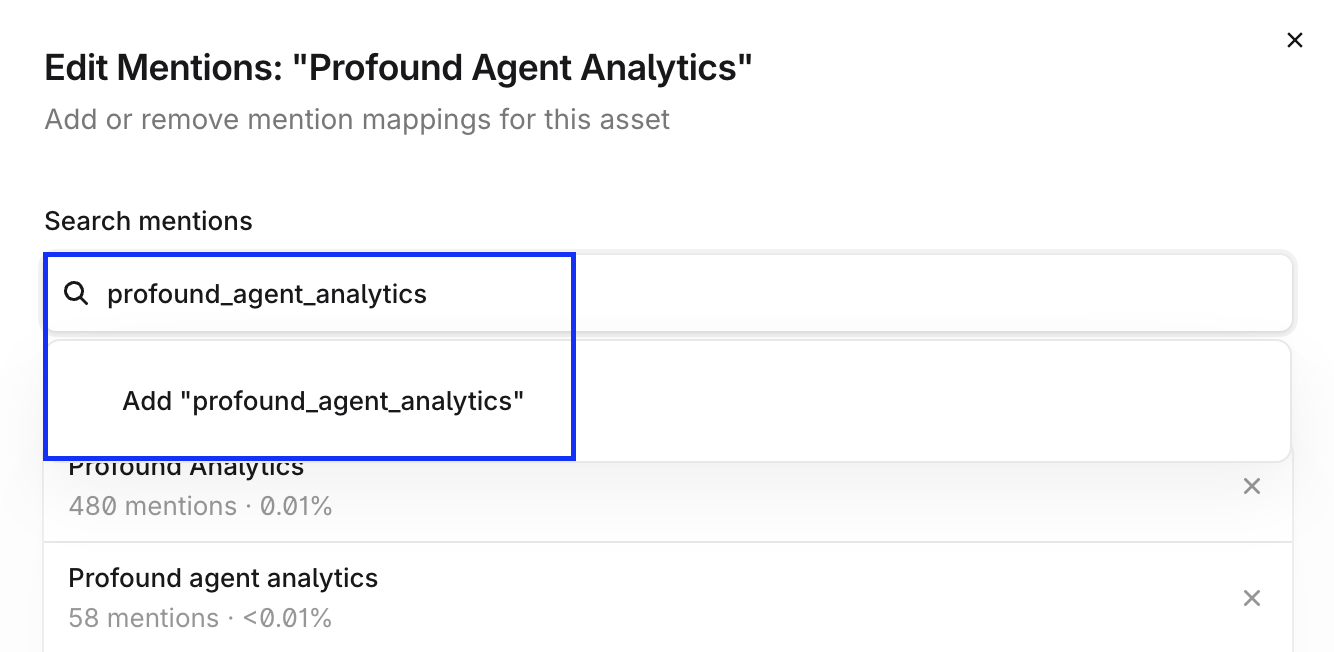
To create a new mention, type it into the search bar and select Add "...".
Group sub-brands under a parent brand
Sub-brands and product lines appear as child assets nested under their parent in the Mapped view. To change a relationship, open the row's action menu:
Merge combines two assets of the same type. You can't merge owned and competitor assets.
Unlink from parent promotes a child asset back to the top level.
When a sub-brand and parent brand are closely related, for example "L'Oréal" and "L'Oréal Hair," Profound can't always tell them apart. Keep the mentions mapped to each asset as mutually exclusive as possible.
Create new mappings
To map assets surfaced in the Unmapped tab, select the mentions, then select + Map Mentions.
To create mappings from the Suggestions tab, select the mentions, then select + Add Mapping to accept the suggestion and keep any current mappings. Select Remap to accept the suggestion and remove all existing mappings.
Use the Export and Upload Mappings controls to export your mappings as a CSV file or upload mappings in bulk.
Entity Parser Configuration
Your Profound team configures the Entity Parser during onboarding, so most customers don't need to change these settings.
Entity Parser Configuration sets which entities Profound extracts from answer engine responses, and lets you add rules for edge cases.
What it does
Entity Parser configuration has two settings:
Entities to Parse — The entity type to focus on during parsing. Options include Companies, Products, People, Product Features, and Publication Sources.
Additional Instructions — Free-text guidance for the extraction model, up to 500 characters. Use it for context-specific parsing rules.
When it's needed
Entity Parser configuration becomes relevant when:
Your brand name is also a common word or phrase, such as "Popsicle," "Comply," or "Good Hands."
You need to extract product names or people, such as CEOs or celebrities, alongside company names.
Default extraction consistently over- or under-counts mentions in a way Name Matching alone doesn't fix.
If your entity extraction behaves unexpectedly, contact your Profound team rather than changing these settings yourself.
FAQ
How often should I review Name Matching?
Check the Unmapped and Suggestions views at least once during your first two weeks on the platform, then periodically after major events: new product launches, rebrands, or an unexpected change in your visibility score.
I pasted a list of domains into the wrong citation category. Can I fix it in bulk?
No. Each Add Citation Category batch applies one category to every URL in it, so check your category selection before you save a large paste. To correct existing rows, delete them individually with the trash icon and re-add them under the right category.
The Configure Competitors section is blank. Did I set something up wrong?
No, blank is the correct default state. Your Profound team configures your competitive set, not this section.
Does Name Matching apply to Shopping?
Yes, Name Matching works across both AEI and Shopping. Learn more about Shopping in 📄 About Shopping.