Agency Mode overview
Last updated: July 27, 2026
Agency Mode is designed for organizations that manage multiple brands or client workspaces under a single account. It allows agencies to create, configure, and manage separate brand environments, enabling focused brand analysis for multiple brand assets.
Each brand workspace operates independently, with its own configuration, data, and lifecycle. This makes it possible to run short-term audits, or pitches, for prospective clients. It also addresses upsell opportunities that agencies have while also maintaining long-running workspaces for an agency’s active clients.
Agency Mode is for marketing agencies and consultancies monitoring multiple brands and clients. This is distinct from Profound's Agent Analytics, which measures how answer engines assess your web presence. Learn more about Agent Analytics here.
Agency Mode workspaces
Agency Mode supports two primary types of workspaces: short-term pitch workspaces, and long-term client workspaces.
Pitch workspaces
Pitch workspaces are designed for short-term evaluations. Agencies use them to assess a prospective client’s AI search visibility, identify AEO growth and upsell opportunities, or prepare materials for other types of sales and business development conversations.
A pitch workspace can be set up by agency Profound users by entering details about the client and any relevant context for the prompts. Profound uses this information to automatically generate industry-specific prompts and launch the workspace. Data generation typically takes 24-48 hours after workspace creation or when new prompts are added. Agency users can also upload a CSV with their own prompts if they prefer that to Profound prompt generation. After uploading prompts via CSV, it takes 48 hours to start seeing data for those new prompts in the workspace.
A pitch workspace can be promoted to a full client workspace if the agency wins ongoing AEO business or wants to monitor a brand workspace on a long-term basis. To keep workspaces organized, pitch workspaces expire after a defined period (typically 30 days). Before expiration, agencies can extend the workspace for another 30 days using a credit, or promote it to a full client workspace by purchasing one from Profound. If no action is taken, the workspace expires automatically at the end of the designated time period.
Expired pitches move to Inactive Workspaces, where historical data remains available in read-only mode for agency users to access later if they need it. Inactive workspaces can be reactivated later for an additional credit use. This can be done if business resumes with a prior prospect.
Active client workspaces
Active client workspaces support ongoing client work. These workspaces are configured for longer durations and are built for continuous monitoring, analysis, and content optimization. This gives agencies the ability to collect data and measure impact of AEO work on clients’ AI search success metrics.
Each client workspace maintains its own prompt set, data stream, competitors, LLMs tracked, and configuration. This allows agencies to manage multiple clients in parallel without overlap. Client workspaces last for the duration of the agency’s contract with Profound or an alternative, agreed-upon time period. Client workspaces are typically larger in size and have more prompts, LLMs, regions, and competitors tracked when compared to pitch workspaces.
Inactive workspaces
Inactive workspaces are workspaces no longer operating. These are primarily pitch workspaces that have expired after their set duration. Pitch workspaces are automatically moved to the inactive section of the agency’s landing page, below the pitch workspaces and client workspace tables. If an agency lets a Pitch workspace expire and needs to reactivate it at any point, they can click the “Start a pitch” button on that inactive workspace to use a credit to reactivate it and begin collecting data for another time increment (typically 30 days).
Agency Mode dashboard
All pitch and client workspaces are managed from the Agency Mode dashboard. From this dashboard, all agency users can view active workspaces, see usage of their Profound contract credits, and track pitch workspace expiration timelines. Admin users from the agency also have the ability to create new pitch workspaces or client workspaces if they have workspace credits available on their account.
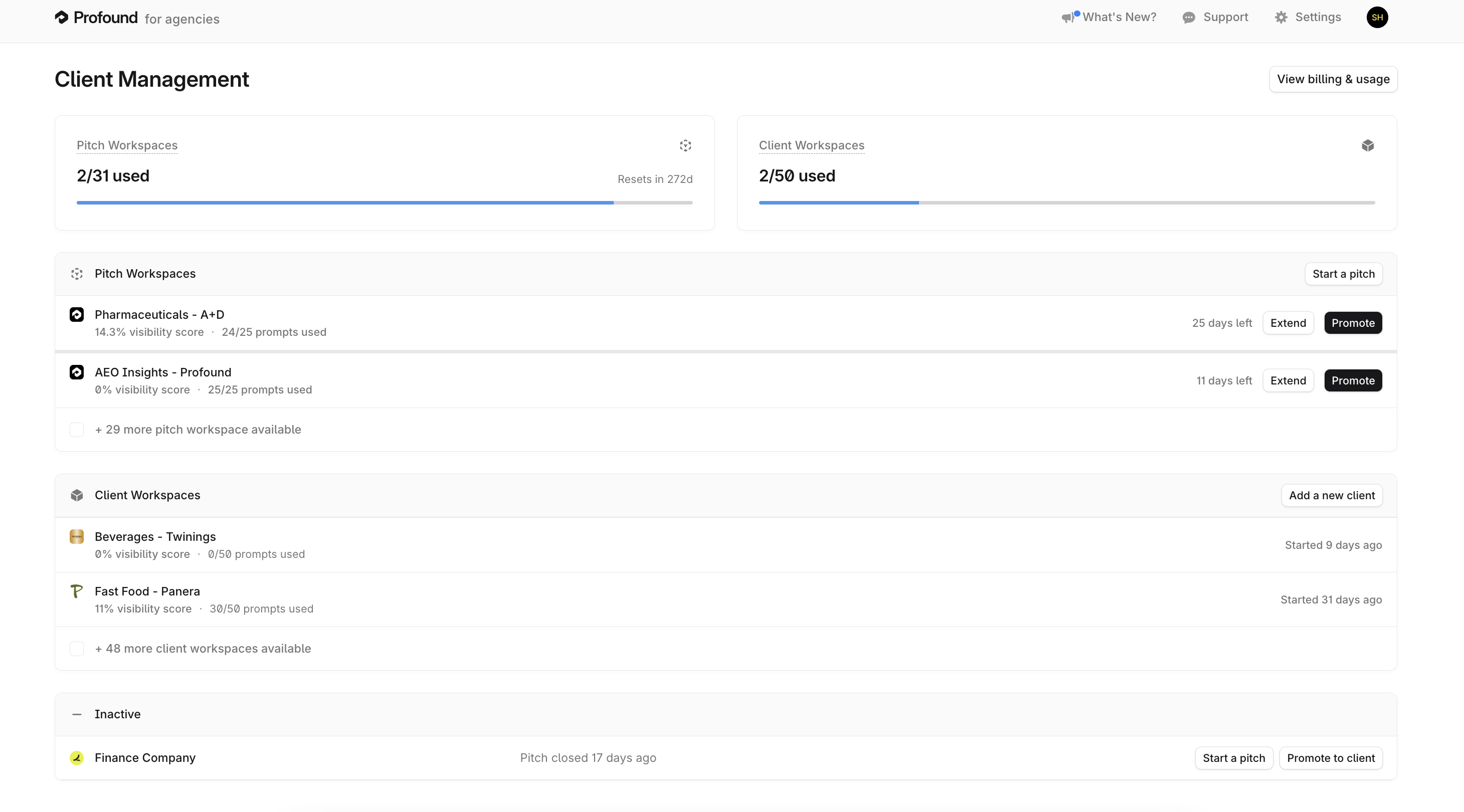
Pitch workspaces can be extended to move past expiration. Alternatively, pitch workspaces can be promoted into a full brand workspace when a prospect becomes a client.
Changes made to any brand workspace do not affect other client workspaces. This separation reduces operational risk and facilitates scaling as the agency’s client base grows.
Workflows, Content, and Agent Analytics are only available on Enterprise plans and are not isolated to one workspace. They are configured at the organization level in Profound and the same information is accessible across client and pitch workspaces.
Track workspace usage and allocations
Agencies can track their Profound resource consumption across workspaces from the Agency Mode Dashboard and the Usage dashboard.
For agencies on the Agency Growth plan, billing and usage is consolidated under a single account. Enterprise agency partners of Profound handle their billing through their dedicated Profound account team.
Manage and increase workspace volume
After an agency purchases a package of Pitch Workspaces from Profound, agency users who are “Admin” roles in their Profound organization can create new workspaces directly within the Profound agency environment.
If you run low on Pitch workspace credits, you can purchase additional workspace packages from Profound.
Enterprise
Agencies that work with a Profound account team can request additional workspace volume directly through their Profound partner.
Self-Serve
Agencies on a Growth plan can contact Profound support to request an increase in workspace volume.
Agency Mode access
Agency Mode is available to agencies on supported plans. Contact your Profound account team to confirm eligibility or enable Agency Mode.
Roles are assigned at the agency level. Admins can create new workspaces, extend workspaces that are about to expire, and invite new agency users from their organization. They can also change roles and permissions for existing users.